Visualize Your Complete Portfolio
Transform your Trading 212 exports into powerful insights. Track dividends, analyze performance, and make smarter investment decisions
Real numbers. Real clarity.
Your trading history, rebuilt as a dashboard you'll actually want to open.
€31.23
JPM · highest payer
NVDA
100 shares · €92.90
TRADING ACTIVITY
REALIZED P&L
19 winning positions
TOTAL DIVIDEND INCOME
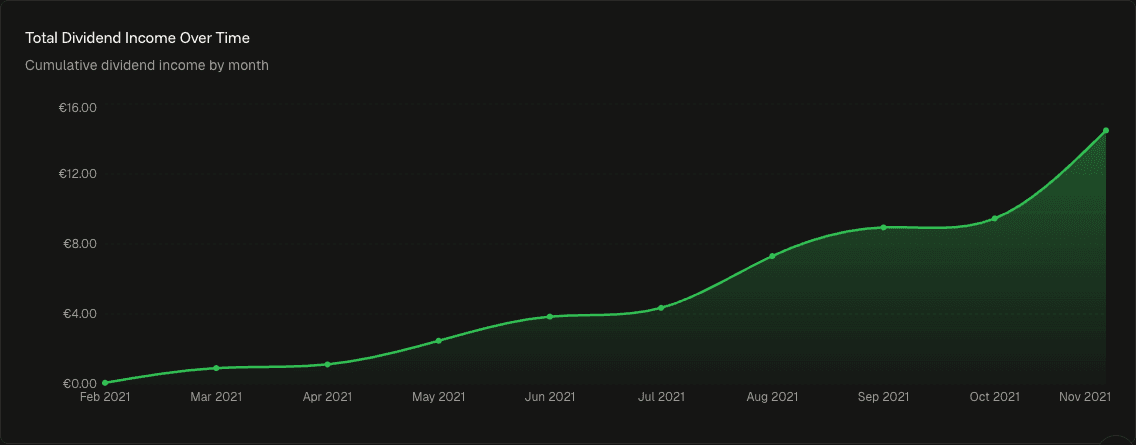
BUY VOLUME
€150,776.29
REALIZED P&L
+€4,212.53
DIVIDENDS
€14.49
POSITIONS
35
Everything you need to understandabout your investments
Features that help you see what's actually happening with your portfolio.
TRADING ACTIVITY
Track every trade, every day
Visualize your trading patterns with an interactive activity heatmap.
PERFORMANCE
Full P&L at a glance
Track your gains and losses over time with detailed analytics.
DIVIDEND TRACKING
Watch your income compound
Monitor dividend income, yields, and payment schedules.
STOCK ANALYSIS
All trades in one view
View individual stocks with full transaction history.
TAX & FEES
See what trading actually costs
Every commission, FX spread, and withholding tax tallied automatically — so you know your real return, not the headline one.
FEES PAID
€47.82
FX COSTS
€12.14
WITHHOLDING TAX
€8.21
NET RETURN
+€4,144.36
MULTI-CURRENCY
Trade across currencies natively
Get started in seconds
No account required. Everything processes in your browser.
Upload your data
Export your Trading 212 transaction history as a CSV and drop it in. Supports drag-and-drop with instant validation.
Explore insights
Get an instant overview — allocation, performance charts, and dividend tracking, all built automatically.
Track performance
Drill into individual stocks, review transaction history, and watch P/L evolve over time.
Frequently asked questions
Ready to see what you're really earning?
Upload your CSV and get clarity in under 10 seconds.